How to Fix Annoying Ceiling Fan Noises

 Do you have a ceiling fan that is driving you insane with annoying clicking or rattling sounds? Maybe even a noisy humming sound from the motor? If so, you’ve come to the right place to get help so you'll be able to solve your fan annoyances with some simple troubleshooting steps that may hopefully get your fan running quietly.
Check for Loose Blade to Blade Iron Screws
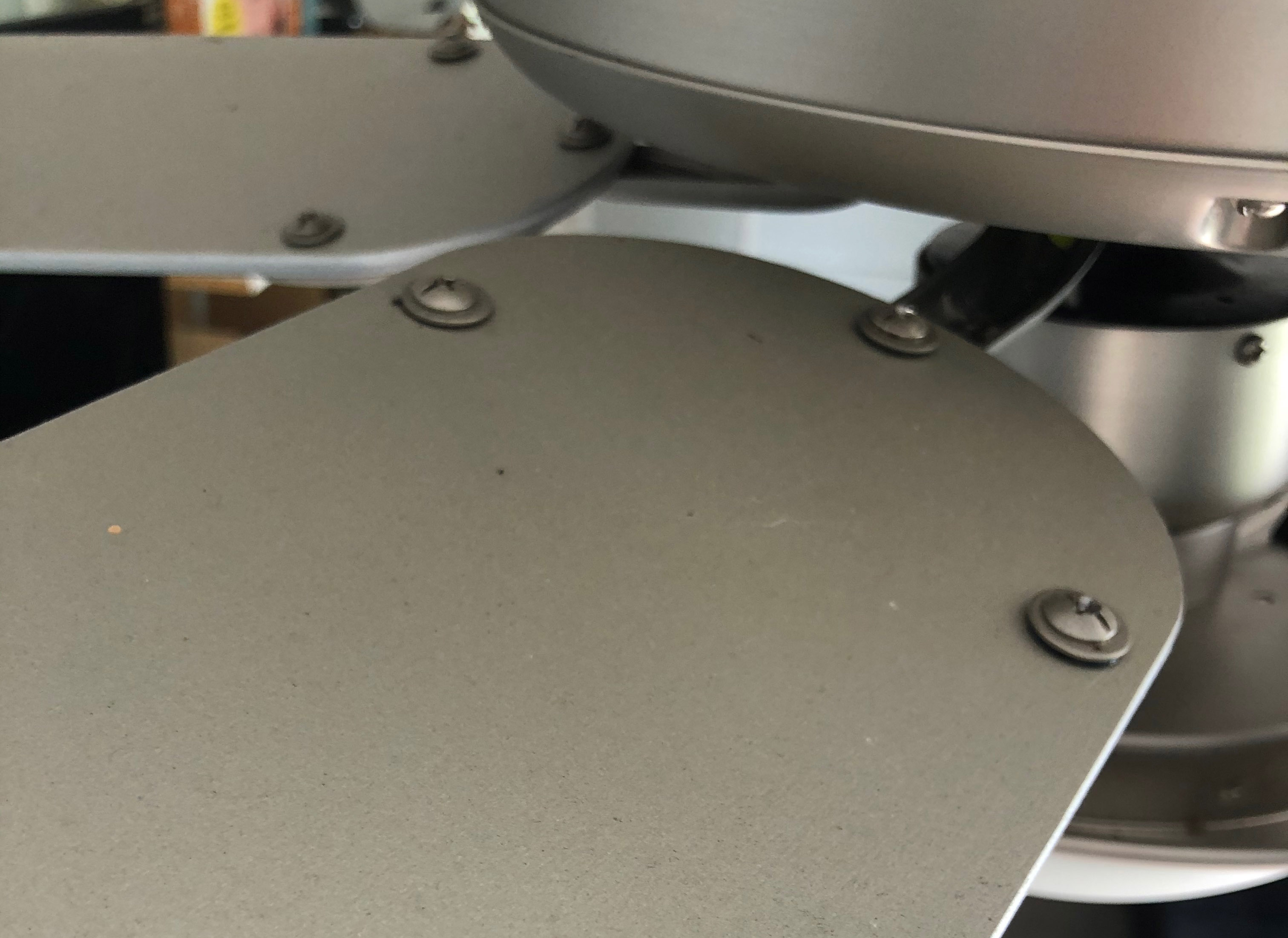
Blade irons are the metal brackets that attach directly to a ceiling fan's motor. The wooden blades attach to these irons. Some people refer to these irons as blade arms, or blade holders.
Most fans will have 3 to 4 screws that hold each fan blade onto the blade iron. If any of these screws are loose, even a little, it can cause what is known as a “blade tick”.
A blade tick is a very annoying clicking sound that seems to come and go sporadicly. It is not timed like the ticking from a clock is. It may pop once or twice here, and four, five, or six times there, and then it may stop for several seconds before coming back again spastically, succeeding at driving you insane. It’s worse than a dripping faucet and must be stopped!
The good news is that a blade tick is an easy fix. Simply get on a ladder and look at the top side of your blades. You will find the blade screws that connect the blades to the blade irons there. They are always close in to the fan motor housing, and never at the blade tips. Simply tighten all screws for each blade as tight as you can. Even the slightest looseness can cause a blade tick. So definitely get them really tight.
Some modern ceiling fans will not use blade irons to connect the blades to the motor. Rather, the blades will connect directly to the motor using three screws that are usually found behind the light fixture (if equipped). The same issue can occur with this setup, and all you'll need to do is tighten those 3 screws found for each blade.
That’s it, if your ceiling fan had a clicking noise, known as a blade tick, now it doesn't.
Canopy Clicking Against the Ceiling

If your are still hearing a similar clicking noise after tightening all of the blade screws, it is possible that the annoying noise you are hearing is coming from the ceiling fan’s canopy. Sometimes if the electrical box the fan is mounted to isn’t installed absolutely perfectly flush and parallel with your celling, you will get a clicking noise similar to the sound of a blade tick in that area.
With a downrod mounted fan, the canopy is the cover hiding the wire connections at the ceiling. With Hunter ceiling fans this can become a pain to deal with, because with most Hunters the canopy is also holding the weight of the fan. With all other brand name fans that I'm aware of there is a hanging bracket behind the canopy, which supports the entire fan. The canopy is simply a decorative cover and is not what is holding your fan to the ceiling these other brand name fans. With all of these, fixing a clicking noise caused by a canopy pop against the ceiling is fairly simple.
To determine if the noise is coming from the canopy on brands such as Fanimation, Minka Aire, TroposAir and more, simply loosen the screws that hold the canopy to the hanging bracket. Then lower the canopy down and let it rest on top of the ceiling fan motor housing.
Once you’ve done so, turn on the fan and see if the clicking noise has gone away. If so, you’ve found the root cause. Raise the canopy back up, but this time when tightening the screws, tighten them only enough to keep the canopy cover in place. Since leaving the canopy somewhat loose prevents it from becoming in a bind against the ceiling, it will almost always solve the issue if the clicking or popping noise is coming from that area of the fan.
If your fan still makes the noise with the canopy lowered, before raising the canopy back up proceed to the next step…
Loose Hanging Bracket or Electrical Outlet Box
If the ticking sound is still present after the canopy was lowered, then your hanging bracket or the electrical outlet box the bracket is attached to may be loose. Thus, possibly being the cause the sounds that are annoying you.
To check for this simply grip the hanging bracket, and with a decent amount of strength try pushing side to side on the bracket. If it's loose you will notice the ceiling fan rock below it when doing this step.
To fix this you’ll need to tighten the two screws that hold the hanging bracket to the electrical outlet box. Sometimes you may have two lock nuts making the connection instead of the screws. In such case, tighten the lock nuts. Whichever you have, make sure they are as tight as they will possibly go. Looseness here is very bad, and can eventually lead to a ceiling fan falling from the ceiling over time.
After tightly securing the hanging bracket, if you are still getting rocking action of the fan below the bracket, then it is probably being caused by a loose electrical outlet box. The electrical box should be supported very well against your home's supporting structure, and it should have no play in it at all. Also, the electrical outlet box required to support a ceiling fan properly should be metal. Although some composite boxes state they are for ceiling fan support, I, nor do ceiling fan manufacturers ever suggest using them.
That said, if the looseness is caused by your electrical outlet box, and that is what is causing the clicking/ticking noises, you may need to call a competent electrician to fix this issue. It will involve taking the entire fan down and starting over with the installation. In such case, I typically suggest having a new fan on site, just incase the ticking is coming from your fan motor and is not fixable. This way you can have the electrician to install the new fan when he or she is there, and not need to pay for a separate home visit fee when he comes back to install a new replacement ceiling fan.
Wire Clicking Against Motor (Flush Mount Ceiling Fans Only)
If you have a flush mounted fan, the type some may call a ceiling hugger ceiling fan, the wiring connection to the ceiling is usually exposed to the motor of the fan. If all wires aren’t tucked in between the hanging bracket and the electrical box properly, it is possible to get a clicking sound caused by a wire hitting screws or vents on top of the motor. Usually this is a ticking sound that can be timed to every full rotation of the fan.
To fix this issue you will need to remove the blades from the motor. The easiest way to do this is to remove the screws that hold the blade irons directly to the motor. There will only be two screws per blade iron, so it is not very time consuming to remove them.
Once the ceiling fan blades are removed, look for the screws that hold the decorative motor cover to the ceiling. Usually you’ll find 4 screws spaced evenly around the top edge of the cover, next to the ceiling. Remove those screws and the cover will come down, giving you good visibility of the motor.
Look above the motor and see if you see a wire that is making contact with it. If so, simply tuck the wire between the fan’s hanging bracket and the ceiling, away from the motor. Spin the motor by hand and the clicking should noise be gone. If so, simply put everting back together in reverse order you used to disassemble it.
Please note: Before tucking in any exposed electrical wire between the ceiling and the hanging bracket it is a good idea to turn power off at the wall switch before hand.

Ceiling Fan Grinding Noise
If you have a grinding sound coming from your fan it is usually only one of two issues. Either your blade irons are scraping against the motor, or your bearings are bad.
If it is the bearings it is time to replace your fan. Oiling them will not solve anything for long, and the noise will come back worse than ever within a couple of days or weeks. The oil will break the grease down that is there to keep the bearing spinning smoothly.
If it’s the blade irons scraping the motor housing it’s probably an easy fix.
To see if the grinding sound is coming from a blade iron scraping against the motor housing, all you'll need to do is look and see where it is scraping. Once you know, the first thing you should do is tighten each of the two screws that connect each blade iron to the motor. Sometimes this alone fixes the problem, so you'll always want to check this first. If after tightening the screws and it no longer scrapes, your work is complete.
If it is still scraping after tightening all screws, your motor may have gotten pushed off center to one side of the motor housing. If this is the case, most of the time this only occurs in new ceiling fans, because can happen during shipping. It’s such an easy fix that it’s probably best to fix it on site rather than to send the fan back and wait on a new one to arrive.
If you do find your motor is misaligned inside of motor in the housing, first, find the side where the blade irons are scraping the housing. Then, with one hand on the switch cover (the part just below the blades) use your other hand to hold the motor housing opposite of where the two parts are making contact. Then pull on the motor housing as you push the switch cover away from where the blade iron to motor contact is being made. If you do this correctly your motor will be back in the center of the housing, and the scraping or grinding will no longer be present.
Last Annoying Ceiling Fan Noise Issue
The last noise issue I can think with a ceiling fan is an electrical humming sound that will not go away. This is usually only present in poor quality ceiling fans, and it is usually a pulsating humming sound. Some people like this sound, claiming it helps them sleep. However, most people hate it, and it has the opposite affect by keeping them from being able sleep.
If your fan has this noise, there are only 4 issues that can be causing it.
- Using a light dimmer to control the ceiling fan from the wall. Fan motors are not compatible with a light dimmer. Change it to a quality fan speed control, designed for a fan and see what happens.
- Controlling a high performance fan motor by a low quality, inexpensive wall mounted fan speed control. Never buy a ceiling fan speed wall control for under $30. They aren’t worth the headache.
- Not getting the full 120 volts of power to the fan. You’ll probably need an electrician to check this, and if you’re not getting full voltage he should be able to find the problem and fix it.
- A poor quality fan motor. Usually any fan sold without a light that cost less than $150 will be made poorly; any fan below $200 with a light. Sometimes the issues don't show immediately from these type of fans, but give it a couple years and you can bet issues like motor noise will surely begin.
That’s All
If the none of these steps fixed your ceiling fan and its annoying sounds, it's now clear you have a bad ceiling fan, and it needs to be replaced. I would suggest changing to a higher quality fan.
If you want the quietest ceiling fan, guaranteed to have zero motor hum, you'll want to buy a fan with a DC motor. DC motors are silent, whereas standard AC motors will always have some electrical noise, even if people without sensitive hearing do not notice it.
If you have a noisy ceiling fan, I hope this article has been a big help in solving your problem. For all other fan questions feel free to comment. Someone on our team will respond and try to answer you questions as soon as possible.
Quality Ceiling Fan Brands at Modern Fan Outlet
Choose A Category to View Different Ceiling Fan Design Choices
| MODERN OUTDOOR TRADITIONAL SMALL |
LARGE NAUTICAL ORNATE KIDS |
TROPICAL DOUBLE MOTOR ORNATE CLEARANCE |
FANS WITH LIGHTS RUSTIC MISSION |